- Iran,Tehran,Jordan,East Arash Boulevard,No.6,Unit 4
Aren Law Institute was established with the cooperation of a group of graduates and continues to this day with the aim of accepting lawyers.

Adjusting the Aperture of Nikon DSLR Cameras
Selecting and adjusting the aperture numbers on most Nikon DSLRs is done in the ways we will teach you. Of course, don’t worry, and if your camera does not support such methods, you can ask us in the comments section.
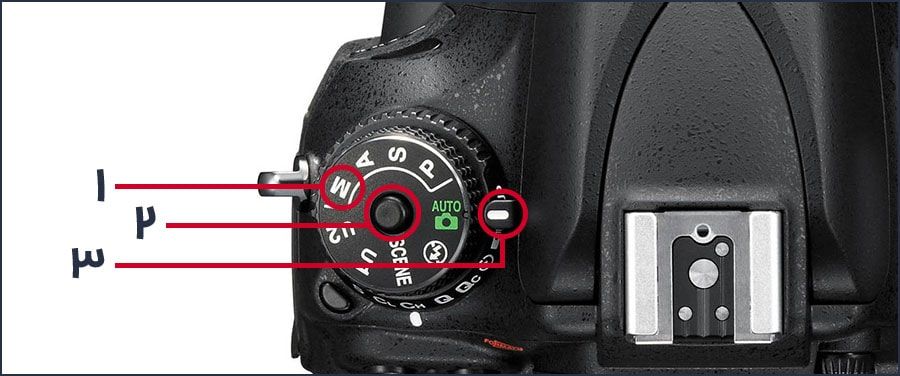
Note that the adjustment methods mentioned in this article are taught with respect to the M (Manual) shooting mode. So before reviewing the methods, be sure to set your camera’s shooting mode to M or manual mode (number 1 – image below). Simply turn the gear on the top of your camera body so that the letter M is in front of the indicator (number 3 – image below). In some cameras, this gear has a release button (number 2 – image below). Be sure to press the release button to turn the gear and hold it in that position. Of course, your camera’s shooting mode setting wheel may not have a button and simply rotate.
Note 1: Button #1 (pictured above) may be located in a different location.
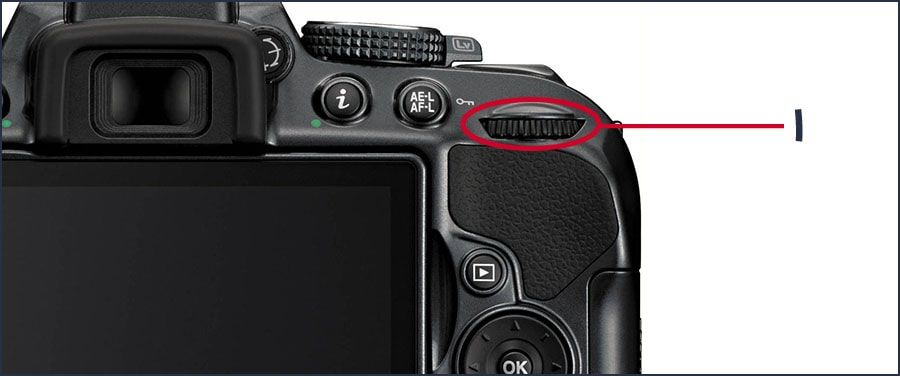
Note 2: Gear #2 (pictured above) may be designed differently (number 1 – picture below).
Method #1:
On Nikon compact body DSLR cameras like the Nikon D5600, to adjust the aperture of these cameras, simply find a button labeled (-/+) on your camera body (number 1 – image below) and while holding it down, turn the other adjustment wheel (number 2 – image below). Please note that in the image below, the shooting mode is set to auto and be sure to set your shooting mode to M as explained above.
Method #2:
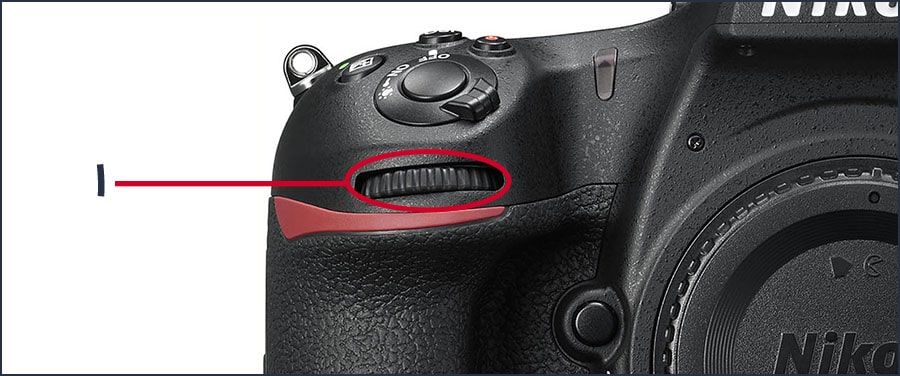
On medium and large-sized Nikon DSLRs, such as the Nikon D7500 and Nikon D850, you can simply turn the secondary dial (number 1 – image below) to select the aperture number. This dial is located just below the shutter button (the photo capture button).

written by:
written by:
written by: